Quick Start
This guide walks through the OpenAlice loop we recommend trying first: ask for read-only research, let Alice track durable context, turn follow-up work into an issue, and receive the result in the Inbox.
You do not need a broker account to get value from OpenAlice. The core stack is issue + tracked entity + inbox: a Linear-like board for work, an Obsidian-like memory layer for assets and themes, and a delivery channel for finished reports.
Your First Research Task
Open OpenAlice and go to Ask Alice. In the desktop app, this is the first
screen after startup. In a source install, open the UI URL printed by
pnpm dev (usually localhost:5173).
In a new AliceProject with no Chat Workspace, Ask Alice first shows a one-time Initialize Ask Alice page. The action creates one durable starter Chat Workspace; it does not pin a separate Harness version. Files, Sessions, and history then stay in that Workspace, and the ordinary composer appears.
The Ask Alice composer starts a workspace session behind the scenes: a native
coding-agent CLI running in a git-backed directory, with OpenAlice's research
and workspace CLIs on PATH.
Choose the Workspace and Agent runtime in the launch context above the composer. Inside the composer toolbar, AI access lets you use that runtime's native login/config or one compatible saved vault credential. Model and effort share a compact menu, remain independently selectable, and still accept a custom model id. After a fresh Session starts successfully, OpenAlice remembers the latest compatible choices in the Workspace's recent interactive layer. This never rewrites its pinned fixed preference or changes an existing Session.
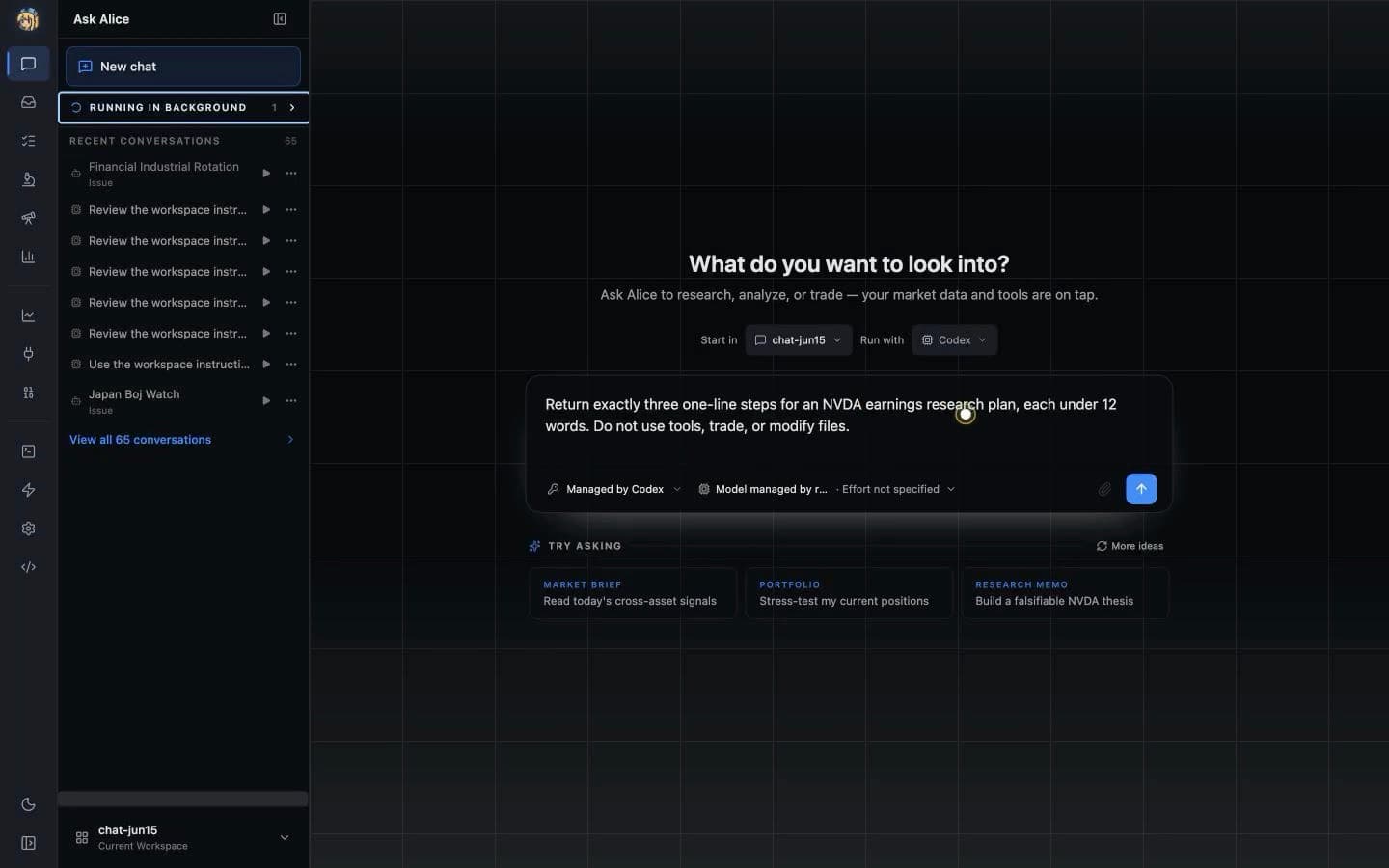
Select the Workspace and coding-agent runtime, describe a bounded task, and launch the Session. This real run asks Codex for a read-only NVDA earnings research plan and shows its three-step response.
Ask for a read-only task first:
What can you tell me about AAPL? Give me a quick overview, including the
business, recent performance, valuation, and the main risks.
Alice can pull market data, company profile, key metrics, news, and technical context without any trading account. The result is ordinary workspace work: the agent reads tools, reasons, writes, and can leave durable files behind.
The suggestion strip highlights real OpenAlice workflows rather than generic chat examples. It rotates through market context, connected portfolios, durable research, Workspace audits, scheduled Issues, and AutoQuant delegation. The short title inserts a fuller prompt with evidence, freshness, persistence, and permission boundaries; use More ideas to see the second set.
You can also try prompts such as:
What are the top gainers in the market today, and which ones look like real
news versus pure momentum?
Calculate the 50-day and 200-day moving averages for NVDA, then explain what
the setup means in plain English.
Search the news for anything about the Fed in the last 24 hours and summarize
what matters for equities.
Track What Should Persist
When Alice finds something you will want to revisit, ask her to track it:
Track AAPL as a stock entity, and create a topic for AI data-center demand.
Link the relevant notes using [[stock-aapl]] and [[ai-data-center-demand]].
Tracked entities are Alice's long-term memory. They create a small cross-workspace index of assets and topics, and [[name]] links let future reports gather backlinks automatically. This is the part that gets better the more you use it: every research note, issue, and report can add context to the same durable graph.
Open the Tracked tab to see the entity list and backlinks. Switch to Graph to reveal clusters, shared notes that bridge several entities, and tracked anchors that do not have supporting material yet. See Entities & Tracking for the full model.

Turn Follow-up Into an Issue
Now make the work self-describing:
Create an issue called "AAPL earnings watch" with medium priority. The goal is
to monitor earnings expectations and update me if the thesis changes.
Alice writes an issue file under .alice/issues/<id>.md. The issue carries board fields like status, priority, and assignee, plus a markdown body with context and links. It shows up on the Issue Board, where you can triage it like a Linear ticket.
When an agent creates the Issue without naming another owner, OpenAlice binds it to that exact product Session and stores its visible @resumeId signature. Choose @new-then-resume when the first scheduled fire should recruit a coworker and keep that Session as the sticky owner; choose @new-each-run only when every fire should intentionally start fresh.
Issues are not just reminders. They are work items the agent can read, update, link to tracked entities, and use as context for future runs.

Schedule a Recurring Run
Ask Alice to make the same issue scheduled:
Run this every weekday at 08:30 America/New_York. Check AAPL news, price action,
analyst changes, and anything linked to [[ai-data-center-demand]]. If nothing
important changed, stay silent. If something matters, write a short markdown
brief and push it to my Inbox.
Scheduling is not a separate cron UI. Alice adds a timezone-aware when and an ownership signature to the Issue; the Markdown body remains the canonical work instruction. The launcher scanner fires due Issues as headless Workspace turns, and the agent reports back through the Inbox only when useful.
Watch the flow in three places:
- Issue Board — the Issue shows status, priority, sticky owner, cadence, automation health, and one change/conversation Activity timeline.
- Activity — while an owner is replying, it can show a compact live timeline of semantic text, tool names/status, and errors without exposing tool input/output.
- Runs — the durable headless execution log shows the final reply, full structured tool activity, and whether it finished.
- Inbox — finished reports arrive as rendered markdown, linked back to the workspace and originating issue.
If a run is interrupted by restart/sleep or fails for a real runtime reason, the detail explains the difference. Retry now reruns the current Issue without shifting its normal schedule. Run now starts an extra immediate turn while leaving the next scheduled time untouched. Set a 15–60 minute run timeout only when the work needs a hard watchdog; the default is no limit.
Read the Report in Inbox
Open the Inbox tab. A good report should be more than a chat reply: it should carry the document Alice wrote, a concise comment, and provenance back to the workspace or scheduled issue that produced it.
Use Reply when you want the exact Session that produced the report to answer in a background thread beside the Inbox entry. Use Open conversation when you want to work interactively in that Session. If an old entry has only Workspace provenance, OpenAlice creates a fresh worker there and labels the answer reconstructed instead of pretending it found the original author. While a reply is running, the thread can show the same bounded live text, tool-status, and error projection as Issue Activity; the final reply replaces that transient progress when the turn ends.

This closes the core OpenAlice loop:
- research creates context
- tracked entities preserve memory
- issues describe work and urgency
- scheduled runs keep checking
- Inbox delivers the artifact when something matters
That loop is the main product surface today. It turns trading into a process an AI agent can manage with you over time.
Optional: Audit Your Workspace Floor
After you have several active desks, open Workspace Manager under Ask Alice and request a read-only audit:
Summarize what each active Workspace owns, flag overlapping work, and list any
failed, interrupted, or unowned Issues. Do not change anything yet.
The manager starts from Workspace and Session indexes, asks attributable coworkers before reconstructing intent, and can preview template upgrades. It is a dedicated control plane rather than another business Workspace. Choose a supported installed Agent and start its Session in Web or TUI. Antigravity and Shell are terminal-only. See Workspace Manager.
Optional: Watch the Office Beta
Enable Settings → Beta → Office to add the preview to the Activity Bar. The
continuous map groups Workspaces into Harness neighborhoods, turns each
Workspace into a furniture pod, and shows each resumeId as a coworker at a
desk. Select a coworker to inspect its Session and recent artifacts, open a
Workspace sign or filing cabinet for files, or use Menu → Occupancy log to
inspect and replay the launcher-owned runtime journal. The Beta gate is local
to this browser or device; Activity Bar placement is stored separately in your
OpenAlice home. See Office.
Optional: Connect a Paper or Demo Trading Account
Trading is available, but treat it as a beta layer after you understand the core loop above. Start with a paper, demo, or testnet account; do not connect live funds until you have validated the workflow yourself.
Open the Web UI's Trading page and add an account through the wizard. If the engine is not installed, OpenAlice first offers the matching checksummed Broker Pack. Then pick a preset and environment, enter credentials, and run the connection test. On success, the account becomes a UTA that Alice can research, stage, commit, and submit for your approval.

| Preset | Markets | Safer first mode | Current notes |
|---|---|---|---|
alpaca | US stocks and ETFs | Paper Trading | Paper and live use separate API keys. Alpaca is currently the most straightforward securities paper account. |
ibkr-tws | Stocks, options, futures, FX, bonds | TWS / IB Gateway paper port | Connects through a local TWS or IB Gateway socket, not API keys. More powerful, but setup is heavier. |
longbridge | HK, US, CN A-shares via Stock Connect, SG equities | Paper Trading | Uses Longbridge OpenAPI credentials. Access tokens expire and must be rotated manually. |
| Crypto via CCXT | Binance, OKX, Bybit, Bitget, Hyperliquid | Demo Trading or Testnet where available | These presets all use the shared CCXT engine. We have personally tested the listed venues; other CCXT exchanges may work through ccxt-custom, but sandbox, demo, symbol, and execution behavior varies by exchange, so expect to validate them yourself. |
For crypto K-lines without an API key, switch to Readonly or Pro mode and enable Binance, OKX, or Bybit under Trading → Public crypto data sources. They are opt-in and read-only; they do not become portfolio accounts. For setup details, caveats, and execution support by broker, see Trading Setup.
Optional: Approval-gated Trade Flow
With a paper account connected, you can ask Alice to prepare a trade:
Buy 1 share of AAPL at market price in my paper account.
Alice will use the UTA beta stack and Trading as Git:
- Stage — Alice stages a
placeOrderoperation - Commit — the operation is committed with a message and hash
- Push — with the default policy, open Trading → Trading as Git and approve before anything reaches the broker
Keep Allow AI to push trades off while learning the system. In that default mode Alice cannot send the committed operations without your explicit Web UI approval. Pro mode exposes an opt-in that delegates push authority to the AI; do not enable it for this walkthrough, and paper-test it separately before considering any live account.
The UTA / Trading-as-Git stack is still unstable. If you hit errors, confusing broker behavior, or a failed push, bring the error to the community or open a GitHub issue so we can reproduce it.
Next Steps
- Issue Board — Track work and schedule recurring runs with markdown issues.
- Entities & Tracking — Build long-term memory for assets and topics.
- Inbox — See how reports get delivered back to you.
- Workspaces — Understand the directory + git + native-agent substrate.
- Sessions & Collaboration — Understand signatures, exact follow-up, and Web.
- Workspace Manager — Coordinate a growing set of active desks.
- External Connectors — Project durable Inbox reports into Discord, Telegram, Slack, or Feishu/Lark.
- Broker Packs — Understand optional broker-engine installation.
- Trading Setup — Optional beta trading setup.